Home / spare_parts
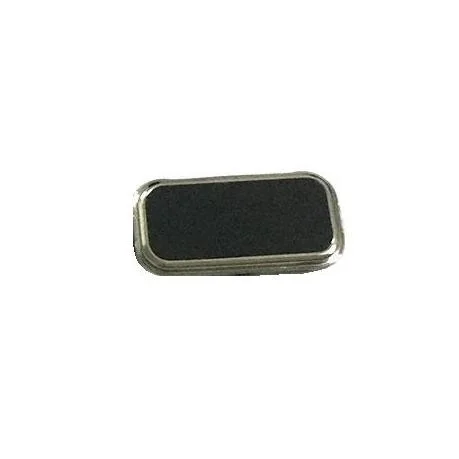
Home Button Outer for Lenovo Vibe P1 Turbo Grey - Plastic Key
₹749
₹369 (Inclusive of all taxes)
In Stock — ships within 24 hrs
Special Offers
Get Flat 10% OFF!
For all orders
SAHII10
Get Flat 15% OFF!
Min. value: ₹1500
SAHII15
Get Flat 20% OFF!
Min. value: ₹2500
SAHII20
100% Money Back Guarantee if product not delivered
Dispatched & Shipped within 24 hrs
Product Description
Is the Home Button cap on your Lenovo Vibe P1 Turbo cracked, chipped, scratched, or physically damaged — affecting both the appearance and the feel of every press? The Home Button Outer for Lenovo Vibe P1 Turbo is the external cap or cover of the Home Button — the part your thumb actually presses — and replacing a damaged outer restores the original smooth, responsive button feel and clean aesthetic of your Lenovo Vibe P1 Turbo's front face.
- Precision-fit Home Button Outer cap designed specifically for Lenovo Vibe P1 Turbo
- Restores the original smooth, tactile surface of the Home Button on Lenovo Vibe P1 Turbo
- Fixes cracked, chipped, or worn button cap without replacing the full Home Button assembly
- Available in original colour and finish matching your Lenovo Vibe P1 Turbo
- Easy to install — adheres or clips over the existing Home Button assembly
- Does not affect fingerprint sensor or button mechanism function in most cases
Restore the feel and look of your Home Button. Order the Home Button Outer for Lenovo Vibe P1 Turbo from SAHII.in — precise cosmetic component, wholesale price, free delivery across India.
Product Specifications
| Compatible Brand | Lenovo |
| Compatible Model | Vibe P1 Turbo |
| Color | Grey |
| Product Type | Home Button Outer |
| Condition | New |
| Packing | Loose Packing |
| In The Box | 1 Unit of Home Button Outer for Lenovo Vibe P1 Turbo |
| Country Of Origin | China |
| Sold By | SAHII.in, New Delhi |
Shipment & Replacement
- Item received is physically damaged.
- Item received has missing parts or accessories.
Order within
15:00
for Today's Dispatch
Estimated Delivery: 2-5 Days


_1.webp)


